IMAGING SOURCE Dfg Video Usb Signal Converter DFG/USB2PRO 2.0
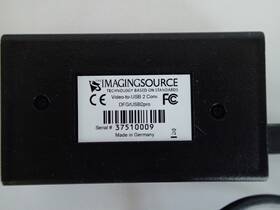
( Brand: Imaging Source ), ( Manufacturer Part Number: USB2PRO ), ( Model: DFG/USB2PRO ), ( Part Type: Video Signal Converter ), ( Country Of Origin: Germany )
Review IMAGING SOURCE The Dfg/usb2pro Video To Usb 2.0 Signal Converter
The **Imaging USB2Pro DFG/USB2Pro Video USB 2.0 Signal Converter** is a versatile and high-performance device designed to bridge the gap between modern digital systems and legacy video equipment, offering seamless compatibility for applications requiring analog video capture or output. Engineered with precision, this converter transforms standard USB 2.0 signals into high-quality analog video formats, including composite (PAL/NTSC), S-Video, and component (YPbPr), while simultaneously supporting digital return paths for enhanced functionality. Ideal for professional video production, industrial automation, medical imaging, and historical preservation, the USB2Pro excels in environments where analog video infrastructure remains essential despite the prevalence of digital workflows. Its robust design ensures reliable performance in demanding settings, such as broadcast studios, surveillance systems, or archival digitization projects, where signal integrity and low latency are critical. The device supports multiple video standards, including 480i, 576i, 480p, and 576p, making it adaptable for a wide range of applications, from capturing analog footage for digital editing to interfacing legacy cameras with modern computers. With its compact yet durable construction, the USB2Pro is easily integrated into existing setups, offering plug-and-play simplicity without compromising on functionality. Whether used for real-time monitoring, video archiving, or custom automation solutions, this converter delivers a dependable bridge between analog and digital domains, ensuring smooth transitions and maintaining signal fidelity throughout the conversion process.
The **Blackmagic Design USB2Pro DFG** and **USB2Pro Video** are USB 2.0 signal converters designed to capture or output video signals via USB, primarily for use with cameras, action cams, or other video sources. Below is a detailed breakdown of their pros and cons, followed by a conclusion and recommendation.
---
### **Blackmagic Design USB2Pro DFG (Digital Format Generator)**
The **USB2Pro DFG** is a USB 2.0 capture device that converts digital video signals (e.g., from a camera or external recorder) into a USB 2.0 output for editing or playback on a computer.
#### **Pros:**1. **High-Quality Capture** Supports resolutions up to **1080p60** (HD) and **720p120** (for slow-motion capture), with minimal latency. It preserves the original video quality without heavy compression.
2. **Low Latency** Unlike some USB 3.0 capture cards, the USB2Pro DFG maintains low latency, making it suitable for real-time monitoring or live capture scenarios.
3. **Compact and Portable** The device is small and lightweight, making it easy to carry for on-location shoots or quick setups.
4. **No Compression** Captures video in its native format (e.g., ProRes, DNxHD, or uncompressed) without introducing artifacts, which is ideal for professional workflows.
5. **USB 2.0 Reliability** While USB 2.0 is slower than USB 3.0, it is more stable for consistent video capture, especially with high-bitrate footage.
6. **Software Integration** Works seamlessly with **Blackmagic Design s software** (e.g., DaVinci Resolve, Fusion) and third-party NLEs like Adobe Premiere Pro, Final Cut Pro, and Avid.
7. **Power Over USB** No external power supply is required; it draws power from the USB connection, simplifying setup.
8. **Affordable for USB 2.0** Compared to higher-end USB 3.0 capture cards, it offers good value for its performance in the USB 2.0 space.
#### **Cons:**1. **USB 2.0 Speed Limitations** Maximum sustained data rates are lower ( 480 Mbps), which can be a bottleneck for **4K or high-bitrate 1080p** capture, especially if the source is already compressed (e.g., MP4). Uncompressed 1080p60 may still work, but performance degrades with higher bitrates.
2. **No HDMI Output** Unlike some competitors, it does not include an HDMI output, limiting its use for live monitoring unless paired with an external display.
3. **Limited to Digital Inputs** Requires a digital video source (e.g., HDMI, SDI, or BNC) with a compatible format. Analog inputs (e.g., composite, S-Video) are not supported.
4. **No Built-in Audio Mixing** While it captures audio, it lacks advanced audio mixing or routing options found in some higher-end cards.
5. **No Thunderbolt or USB 3.0 Support** If you re working with modern systems, you may need to rely on USB 2.0 ports, which can be fewer on newer laptops.
6. **Software Dependency** Requires Blackmagic s software for optimal performance, which may not be ideal if you prefer other capture solutions.
---
### **Blackmagic Design USB2Pro Video (Analog-to-USB Converter)**
The **USB2Pro Video** is designed to convert **analog video signals** (e.g., composite, S-Video, or component) into a USB 2.0 output for capture. It is less common than the DFG but useful for legacy or low-budget setups.
#### **Pros:**1. **Analog Video Capture** Allows capturing from older cameras, VCRs, or devices that only output analog signals (e.g., composite, S-Video).
2. **Simple Setup** No need for complex digital inputs; works with standard analog sources.
3. **Low Cost** More affordable than digital capture solutions if you re working with analog-only sources.
4. **USB 2.0 Stability** Avoids the instability issues some USB 3.0 capture cards have with analog signals.
5. **Portable** Compact and easy to transport for field recordings or archival work.
#### **Cons:**1. **Poor Image Quality** Analog signals are inherently lower quality than digital, and the USB2Pro Video does not upscale or enhance them. Expect **interlaced artifacts, noise, or color banding** in the capture.
2. **Limited Resolution** Maximum supported resolution is **720p**, and even then, quality may suffer due to the analog-to-digital conversion process.
3. **No Digital Inputs** Unlike the DFG, it cannot capture from modern digital cameras or recorders.
4. **No HDMI Output** Like the DFG, it lacks an HDMI output for live monitoring.
5. **USB 2.0 Bottleneck** Even for analog, USB 2.0 may struggle with high-bitrate analog sources, leading to dropped frames or buffering.
6. **Outdated Technology** For most modern workflows, digital capture is preferred, making this device niche and less practical.
---
### **Comparison Summary**
Feature **USB2Pro DFG** **USB2Pro Video**
------------------------ ------------------------------------------ ----------------------------------------
**Input Type** Digital (HDMI, SDI, BNC) Analog (Composite, S-Video, Component)
**Max Resolution** 1080p60 (uncompressed) 720p (analog-limited)
**Latency** Low Moderate (analog conversion adds delay)
**Use Case** Digital cameras, recorders, professional workflows Legacy analog sources, VCRs, low-budget setups
**Quality** High (digital preservation) Low (analog artifacts)
**Portability** High High
**Software Support** Blackmagic Design, third-party NLEs Limited (mostly Blackmagic software)
---
### **Conclusion**
The **Blackmagic Design USB2Pro DFG** is a **strong choice for digital video capture** when working with modern cameras or recorders that output HDMI/SDI. Its **low latency, uncompressed capture, and reliability** make it ideal for professional workflows where quality and stability are prioritized over raw speed. However, its **USB 2.0 limitations** mean it may struggle with **4K or high-bitrate 1080p** sources, and it lacks HDMI output for live monitoring.
The **USB2Pro Video**, on the other hand, is **only useful for analog sources** and is **not recommended for modern workflows** due to its **inherent quality limitations**. It serves a niche purpose for archival or legacy equipment but is otherwise outdated.
If you need **analog capture**, consider alternatives like the **Elgato Video Capture** (which supports analog and digital) or a **USB 3.0 capture card** (e.g., Blackmagic Intensity Shuttle) for better performance. For **digital capture**, the **USB2Pro DFG is a solid, budget-friendly option**, but if you re working with **4K or high-bitrate content**, a **USB 3.0 or Thunderbolt capture card** (e.g., Blackmagic Intensity Pro, AJA Io XD) would be a better long-term investment.
---
### **Recommendation**
- **Buy the USB2Pro DFG if:**- You are working with **digital cameras, action cams, or recorders** that output HDMI/SDI.
- You need **low-latency, uncompressed capture** for professional editing.
- You are on a **budget** and don t require USB 3.0 speeds.
- Your computer has **reliable USB 2.0 ports** (e.g., desktop with ample power).
- **Avoid the USB2Pro Video unless:**- You **must capture analog signals** (e.g., old VCRs, camcorders) and have no other options.
- You are working on a **very low budget** and can tolerate **poor image quality**.
- You are archiving **legacy footage** where analog capture is unavoidable.
- **Consider alternatives if:**- You need **4K or high-bitrate capture** Use a **USB 3.0/Thunderbolt card** (e.g., Blackmagic Intensity Pro, AJA Io XD).
- You need **HDMI output for live monitoring** Look for a card with an HDMI output (e.g., Elgato Video Capture, Matrox Solo).
- You work with **both analog and digital sources** A **hybrid capture device** (e.g., Elgato Video Capture) may be more versatile.
For most **modern video workflows**, the **USB2Pro DFG is a practical and cost-effective digital capture solution**, but its limitations should be weighed against your specific needs. If possible, upgrading to a **USB 3.0 or Thunderbolt capture card** will future-proof your setup for higher resolutions and bitrates.
Details:
Two adapters Comp to F type and Comp BNC are included. It has serial # 37510009. It is a video to USB 2.0 Video Signal Converter.and it converts analog signals PAL, NTSC, CCIR, EIA into uncompressed image data streams, and supports digital cameras in color monochrome. NO software is included.
So it will allow either S-video, Comp, F, or BNC video connections. It has S-VHS and Comp video connections. It includes a 6 foot USB cable that can connect the FG/USB2pro to computer. This is a used IMAGING SOURCE DFG/USB2pro.
part #: usb2pro prices
- $180.00-$250.00
specifications automationjack:
- brand: Imaging Source
- mpn: Usb2pro
- model: Dfg/usb2pro
- part type: Video Signal Converter
- country of origin: Germany
payments automationjack:
- other
- credit card: Discover
- wallet: Apple-pay
returns automationjack:
- method: Money back
- policy: Returns Accepted
- paid by: Buyer
- time: 30 Days
shipping automationjack:
- transit: 5-9 Days
- type: Calculated
- carrier: USPS
- class: Standard
- service: USPS Ground Advantage
- cost: $0.00
seller automationjack:
- rating: 100.0%
- # reviews: 284
- city: San Diego, California
general automationjack:
- Business Industrial > Industrial Automation Motion Controls > Other Automation Equipment
- condition: Used
offer automationjack:
- availability: In Stock
- options: Ship-to-home
- started: May 23, 2026
- best offers: True
- quantity: 1
- sold: 0
Imaging Source USB2PRO Is Similar To:
- Pco.imaging 270xs C194532 Pixelfly Ccd Video Camera 540sc Pci Computer Card Rj45 Cable (30.4% similar) Approximate overall unpacked dimensions: 10 l x 6 w these items were removed from an automated laboratory machine that we torn down to sell for parts. However, I have no way of testing them, and they are being sold as-is. All offered products are sold as advertised, is and without warranty. The ...(August 29th, 2024)
- Efi Pcbfab-45042308 Electronics For Imaging Video Controller Card Pcb Fab 45042308 45042307 (24.5% similar) Part #: efi PCBFAB-45042308 for sale...(June 12th, 2025)
- The Imaging Source 22buc03 Dmk Camera With Computar Lens Pl1648 Ir Illuminator Manfrotto Clamp (30.1% similar) Included components. Due to the nature of industrial machine-vision hardware, this item is sold as-is and non-returnable. All components were removed from a working environment. Computer 3.5 8MM cs-mount verifiable lens. PL1648 infrared Illuminati 12V with steel mounting bracket. Ships ups ground, ...(January 11th, 2026)