VISTACNC Imachiii Usb Cnc Handwheel Pendant P1A-S
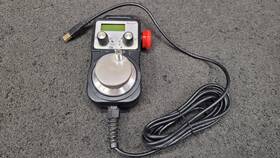
( Brand: Vistacnc ), ( Manufacturer Part Number: P1AS ), ( Part Type: Work ), ( Country Of Origin: United States )
Review VISTACNC Imachiii Usb Cnc Handwheel Pendant Used Works
The **Vista CNC P1AS IMachIII P1A-S USB CNC Handwheel Pendant** is a precision-engineered, user-friendly control interface designed to elevate the functionality and ease of operation for CNC machines, particularly those running on the IMachIII P1A-S control system. This compact yet highly versatile pendant is engineered to provide seamless integration with a wide range of milling, turning, and multi-axis CNC setups, offering operators real-time feedback and intuitive control over their machining processes. Built with a robust, ergonomic design, the pendant features a high-resolution, backlit LCD display that delivers clear visibility of critical parameters such as feed rates, spindle speed, toolpath progress, and coordinate values, even in low-light environments. Its intuitive touch-sensitive controls, including dedicated handwheel buttons for precise manual jogging and fine-tuning adjustments, allow for effortless manual operation, making it ideal for setup, alignment, and fine-tuning tasks where split-second responsiveness is crucial.
The pendant s **USB connectivity** ensures a stable and reliable data transfer link with the CNC controller, eliminating the need for complex wiring or proprietary interfaces, while its **compact and portable form factor** makes it easily mountable on machine tool turrets, pendant arms, or even handheld operation for greater flexibility. The inclusion of **customizable function keys** and **soft keys** enables users to program frequently accessed commands, such as tool changes, coolant control, or cycle start/stop, directly from the pendant, reducing downtime and enhancing productivity. Additionally, the pendant supports **multi-axis control**, allowing for synchronized movement across X, Y, Z, and additional axes, which is essential for complex machining operations in industries such as aerospace, automotive, and prototyping.
Safety and durability are paramount in the design of this pendant, with **IP-rated enclosures** (depending on the model variant) to protect against dust, debris, and moisture, ensuring reliable performance in demanding workshop environments. The handwheel itself is precision-machined for smooth, tactile feedback, reducing operator fatigue during prolonged use, while its **adjustable resistance** allows for fine-tuned control over rapid and slow movements. The **IMachIII P1A-S compatibility** ensures seamless integration with Vista CNC s advanced control software, which includes features like **G-code editing, real-time diagnostics, and adaptive feed control**, further enhancing the pendant s utility for both novice and experienced operators. Whether used for manual operation, machine setup, or troubleshooting, the **Vista CNC P1AS IMachIII P1A-S USB CNC Handwheel Pendant** stands as a sophisticated yet accessible tool that bridges the gap between precision engineering and user convenience, ultimately contributing to higher efficiency and accuracy in CNC machining applications.
The **Vista CNC P1AS IMachIII P1A-S USB CNC Handwheel Pendant** is a popular choice for hobbyists and small-scale CNC users, particularly for controlling machines like the **Shapeoko, Carbide 3D, or other USB-based CNC controllers**. Below is a detailed breakdown of its pros and cons, followed by a conclusion and recommendation.
---
### **Pros of the Vista CNC P1AS IMachIII P1A-S**
1. **Compatibility with Popular CNC Machines**
The pendant is designed to work seamlessly with USB-based CNC controllers, including the **IMachIII P1A-S**, **Shapeoko 3**, **Carbide Motion**, and other GRBL-based systems. It provides a dedicated handwheel interface, which is more intuitive than using a computer keyboard or touchscreen for manual operations.
2. **Handwheel Functionality**
The built-in handwheel allows for precise manual jogging, probing, and homing without needing to rely on a computer. This is particularly useful for:
- Fine-tuning toolpaths
- Adjusting positions during setup
- Manual probing (with compatible software)
- Quick homing or emergency stops
3. **Compact and Portable Design**
The pendant is small and lightweight, making it easy to carry and attach to different CNC machines. It can be mounted on the machine s gantry or kept nearby for manual control.
4. **USB Connection (No Extra Wiring Needed)**
Since it connects via USB, there s no need for additional cables or interfaces beyond what the CNC machine already uses. This simplifies setup and reduces potential points of failure.
5. **Affordable Compared to Dedicated Pendants**
While not the cheapest option, it is significantly more affordable than high-end industrial pendants (e.g., **Heidenhain, Fanuc, or Siemens**). It offers a good balance between cost and functionality for hobbyists and small workshops.
6. **Software Flexibility**
The pendant works with **GRBL, UCCNC, Mach3, and other CNC software**, making it adaptable to different control systems. Some users also report compatibility with **Estlcam, Fusion 360, and other CAM software** when paired with the right drivers.
7. **Durable Construction**
The pendant is built to withstand regular use in a workshop environment. The handwheel is sturdy, and the USB port is protected from accidental disconnections.
8. **Easy to Install and Configure**
Most users find the setup straightforward, especially if they are already familiar with GRBL or similar control systems. The pendant typically requires minimal additional configuration beyond basic USB connection.
9. **Useful for Manual Operations**
For users who frequently perform manual operations (e.g., drilling, deburring, or fine adjustments), the handwheel pendant provides a more ergonomic and efficient way to control the machine compared to a keyboard.
10. **Good for Learning CNC**
The pendant is an excellent tool for beginners learning CNC machining, as it bridges the gap between software-based control and hands-on operation.
---
### **Cons of the Vista CNC P1AS IMachIII P1A-S**
1. **Limited to USB-Based Systems**
The pendant **only works with USB-controlled CNC machines**. If you re using a **parallel port (e.g., Mach3 with a breakout board) or Ethernet-based controller (e.g., LinuxCNC)**, this pendant will not be compatible.
2. **No Built-in Display**
Unlike some industrial pendants (e.g., **Heidenhain TNC 426**), this pendant **does not have its own screen**. All feedback and status updates must be viewed on the connected computer, which can be less convenient during manual operations.
3. **Dependence on Computer Software**
Since the pendant relies on the host computer s CNC software (e.g., GRBL, UCCNC), any issues with the software (freezes, crashes, or misconfigurations) will directly affect the pendant s functionality. This is less ideal for standalone operation.
4. **No Advanced Industrial Features**
The pendant lacks features common in industrial pendants, such as:- **Multi-axis control** (beyond X, Y, Z)
- **Built-in diagnostics** (e.g., motor current monitoring, spindle RPM feedback)
- **Emergency stop button** (some users report this is missing or not as robust as industrial units)
- **DRO (Digital Readout) integration** (though some software can display this on the computer screen)
5. **Potential USB Connection Issues**
While USB is convenient, some users report occasional **connection drops or latency**, especially if the USB port on the CNC controller is low-quality or overloaded. This can disrupt manual operations.
6. **Not Ideal for High-Speed Machining**
The pendant is designed for **manual and semi-automatic control**, not for high-speed, high-precision industrial machining. For professional use, dedicated industrial pendants with better feedback and response times are preferred.
7. **Limited Customization**
Unlike some industrial pendants, this one does not allow for extensive **software or firmware customization**. The functionality is largely dependent on the host software.
8. **No Built-in Spindle Control**
The pendant does not include **spindle speed or coolant control** directly. These functions must be managed through the host software, which can be less convenient during manual operations.
9. **Durability Concerns with Handwheel**
While generally sturdy, some users report that the **handwheel mechanism may wear out over time** with heavy or frequent use, especially if the pendant is dropped or mishandled.
10. **Learning Curve for Beginners**
While the pendant itself is easy to use, **setting up the CNC software (e.g., GRBL, UCCNC) can be confusing for absolute beginners**. Some users spend extra time troubleshooting communication issues between the pendant and the controller.
---
### **Conclusion**
The **Vista CNC P1AS IMachIII P1A-S USB CNC Handwheel Pendant** is a **solid, budget-friendly choice** for hobbyists, small workshops, and users working with **USB-based CNC machines** (e.g., Shapeoko, Carbide 3D, or GRBL-controlled setups). It excels in **manual control, portability, and ease of use**, making it ideal for:
- **Manual jogging and probing**
- **Quick adjustments during machining**
- **Users who prefer a dedicated handwheel over a keyboard**
- **Those on a budget who don t need industrial-grade features**
However, it is **not a replacement for industrial pendants** and has **limitations in terms of standalone operation, advanced diagnostics, and multi-axis control**. If you re working with **parallel port or Ethernet-based systems**, this pendant will not be compatible.
---
### **Recommendation**
**Buy the Vista CNC P1AS IMachIII P1A-S if:**You use a **USB-based CNC machine** (e.g., GRBL, IMachIII, Shapeoko).
You frequently perform **manual operations** and want a dedicated handwheel.
You re a **hobbyist or small workshop user** who doesn t need industrial-level features.
You prefer **portability and simplicity** over advanced diagnostics.
You re comfortable with **GRBL or similar CNC software**.
**Avoid the Vista CNC P1AS IMachIII P1A-S if:**You use a **parallel port or Ethernet-based CNC controller** (e.g., Mach3 with breakout board, LinuxCNC).
You need **standalone operation without a computer**.
You require **multi-axis control, advanced spindle monitoring, or emergency stop features**.
You re working on **high-precision industrial machining** where latency and feedback are critical.
You re a **complete beginner** who may struggle with CNC software setup.
---
### **Alternatives to Consider**
- **For USB-based systems with more features:** **Carbide Motion (with manual jog wheel)** or **UCCNC with a dedicated pendant**.
- **For parallel port systems:** **Mach3 with a breakout board and manual jog wheel**.
- **For industrial-grade control:** **Heidenhain, Fanuc, or Siemens pendants** (if budget allows).
- **For a simpler, cheaper option:** **A basic USB handwheel (e.g., from Amazon or eBay)** if you don t need the IMachIII compatibility.
---
### **Final Verdict**
The **Vista CNC P1AS IMachIII P1A-S** is a **great value for hobbyists and small-scale users** who need a reliable, portable handwheel pendant for manual CNC control. While it lacks some advanced features, it fills a niche well for its intended audience. If your setup matches its compatibility requirements, it s a **highly recommended purchase**. Otherwise, consider alternatives based on your specific needs.
Details:
Will need to be flashed back windows use on mach LOC B5 Used, Was on a Linux CNC machine.
part #: p1as price
- $164.99
specifications automationjack:
- brand: Vistacnc
- mpn: P1as
- part type: Work
- country of origin: United States
seller automationjack:
- # reviews: 2467
- city: Vancouver, Washington
- rating: 99.8%
payments automationjack:
- other
- wallet: Paypal
- credit card: Visa
general automationjack:
- Business Industrial > Industrial Automation Motion Controls > Other Automation Equipment
- condition: Used
shipping automationjack:
- type: Calculated
- transit: 4-7 Days
- cost: $10.13
- carrier: USPS, FedEx, UPS
- class: Standard, Expedited
- service: USPS Ground Advantage, USPS Priority Mail, FedEx Ground / FedEx Home Delivery, UPS Ground
offer automationjack:
- availability: In Stock
- options: Ship-to-home
- best offers: True
- quantity: 1
- started: June 6, 2026
- sold: 0
returns automationjack:
- policy: No Returns