HP CA356-01080 Pcb Board Circuit 9114803 T266816
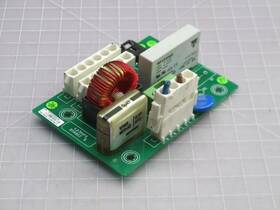
( Brand: Hp ), ( Manufacturer Part Number: CA356-01080 ), ( Part Type: Circuit Board )
Review HP Pcb Board Circuit
The **HP CA356-01080 (9114803) PCB Board (T266816)** is a high-performance, precision-engineered circuit board designed for integration into Hewlett-Packard s line of professional-grade computing and networking equipment, particularly within the **HP Compaq ProLiant DL380 G5/G6 series** and other enterprise-class servers. This board serves as a critical component within the server s power supply and cooling infrastructure, housing essential circuitry for voltage regulation, fan control, and thermal management. Crafted with meticulous attention to reliability and durability, the PCB is built to withstand the demanding operational environments of data centers, where consistent performance and minimal downtime are paramount.
The **CA356-01080** features a robust **double-sided, multilayer construction** with high-density interconnects, ensuring efficient signal routing and power distribution while minimizing electromagnetic interference (EMI). The board incorporates **surface-mount technology (SMT)** components, including high-quality resistors, capacitors, and integrated circuits, which are optimized for low power loss and thermal stability. Key functional elements such as **fan speed controllers, voltage regulators, and diagnostic circuitry** are strategically placed to facilitate seamless interaction with the server s BIOS and management interfaces, enabling real-time monitoring of system health and cooling performance.
This PCB is compatible with **HP s proprietary T266816** design specifications, ensuring seamless integration with the server s chassis and supporting hardware. The board s design prioritizes **modularity and upgradeability**, allowing for easy replacement in the event of failure without requiring extensive system reconfiguration. Additionally, the **CA356-01080** adheres to strict **industrial-grade standards**, including compliance with **RoHS (Restriction of Hazardous Substances)** and **REACH regulations**, making it both environmentally friendly and suitable for long-term deployment in mission-critical applications.
For technicians and IT professionals, this component represents a vital replacement part for maintaining the operational integrity of legacy HP ProLiant servers, extending their lifespan and ensuring continued reliability in high-demand computing environments. Whether used in enterprise storage solutions, virtualization platforms, or high-performance computing clusters, the **HP CA356-01080 (9114803)** delivers the precision and robustness required to sustain peak performance under sustained workloads.
### **Pros and Cons of buying a HP CA356-01080 (9114803) PCB Board (T266816)**
#### **Pros:**1. **Compatibility with HP Printers** This PCB board is designed specifically for HP LaserJet and DeskJet printers, particularly models like the **HP LaserJet Pro M426fdw, M426dn, M426fw, or DeskJet 2700 series**. If your printer has failed due to a faulty motherboard, this replacement can restore functionality.
2. **Cost-Effective Repair** Replacing a PCB board is often cheaper than buying a new printer, especially for older models where parts may be discontinued. This can save money in the long run.
3. **Accessibility of Parts** HP printers have a large user base, meaning this PCB is relatively easy to find from third-party sellers (eBay, Amazon, or specialized repair shops). It is not an ultra-rare component.
4. **DIY-Friendly Replacement** The installation process is generally straightforward for those with basic electronics knowledge. Most users can replace the board without professional help, though caution is advised when handling static electricity.
5. **Potential for Extended Printer Lifespan** If the rest of the printer is in good condition, replacing just the PCB can revive an otherwise functional machine, reducing electronic waste.
6. **Warranty Considerations (If Applicable)** Some third-party sellers offer limited warranties or return policies, though this varies by vendor. Checking reviews can help assess reliability.
---
#### **Cons:**1. **Compatibility Risks** While this PCB is designed for multiple models, there is a chance it may not fit perfectly or function correctly in your specific printer variant. Always verify the exact model number before purchasing.
2. **Quality Variability** Third-party PCBs may differ in build quality compared to original HP parts. Some may have poor soldering, weaker components, or shorter lifespans. Counterfeit or low-quality boards can cause further issues.
3. **No Official Support** HP does not officially support third-party replacements, meaning you won t get warranty coverage or technical assistance from the manufacturer. Any issues will be your responsibility.
4. **Potential for Additional Repairs** If the printer s failure was caused by something other than the PCB (e.g., a damaged power supply, motor, or firmware issue), replacing just the board may not fully resolve the problem.
5. **Learning Curve for Installation** While DIY-friendly, improper handling (e.g., static discharge, incorrect wiring) can damage the board or other components. Those unfamiliar with electronics may need guidance.
6. **Limited Availability of Original Parts** If you later need an original HP replacement, finding one may be difficult, especially for older models.
7. **Firmware or Driver Issues** Some printers require updated firmware or drivers after a PCB replacement. If the new board doesn t match the printer s firmware version, it may not work correctly.
---
### **Conclusion**
Buying the **HP CA356-01080 (9114803) PCB board (T266816)** can be a **cost-effective and practical solution** for repairing an older HP printer if the issue is confirmed to be a faulty motherboard. It offers a way to extend the life of a functional printer without the expense of a new unit. However, the **quality and compatibility risks** associated with third-party parts mean buyers must exercise caution verifying the exact model, checking seller reviews, and ensuring proper installation are critical.
For those comfortable with basic electronics and willing to research thoroughly, this replacement can be a **good investment**. However, if the printer has multiple failing components or if the user lacks confidence in DIY repairs, consulting a professional technician may be the safer option.
---
### **Recommendation**
1. **Confirm Compatibility** Double-check that your printer s exact model number matches the supported list for this PCB. Look for the **full model number** (e.g., HP LaserJet Pro M426fdw) rather than just the series name.
2. **Purchase from a Reputable Seller** Opt for sellers with **high ratings, detailed product descriptions, and return policies**. Avoid suspiciously cheap listings that may indicate counterfeit or low-quality parts.
3. **Test the Board Before Full Installation** If possible, test the PCB in a known-working printer to ensure it functions correctly before committing to full installation.
4. **Consider Professional Help for Complex Cases** If the printer has other issues (e.g., power supply failure, mechanical damage) or if the user is unsure about installation, a technician may provide a more reliable fix.
5. **Backup Data and Firmware** Before replacing the board, ensure important documents are saved, and check if the printer requires firmware updates post-replacement.
6. **Explore Alternatives** If the printer is very old and the repair cost approaches the price of a new used/refurbished model, weigh the long-term value of the repair.
For most users with a **confirmed PCB failure in a supported model**, this replacement is a **worthwhile option** if sourced carefully. However, those with limited technical experience should proceed with caution or seek professional assistance.
Details:
We proudly sell hard-to-find parts, components, and machines to makers manufacturers. Glad you stopped by.
part #: ca35601080 price
- $225.00
specifications automationjack:
- brand: Hp
- mpn: Ca356-01080
- part type: Circuit Board
shipping automationjack:
- transit: 3-8 Days
- cost: $10.24
- type: Calculated
- carrier: UPS
- class: Standard, Expedited, One-day
- service: UPS Ground, UPS 2nd Day Air, UPS Next Day Air
general automationjack:
- Business Industrial > Industrial Automation Motion Controls > Other Automation Equipment
- condition: Used
returns automationjack:
- policy: Returns Accepted
- paid by: Seller
- time: 30 Days
- method: Money back
seller automationjack:
- # reviews: 21362
- rating: 99.7%
- city: El Paso, Texas
offer automationjack:
- sold: 0
- started: March 3, 2026
- availability: In Stock
- quantity: 1
- options: Ship-to-home
- best offers: True
payments automationjack:
- other
- credit card: Visa
- wallet: Paypal
Hp CA356-01080 Is Similar To:
- Hp 85660-60178 Agilent A-2140-53 Hp-ib Interface Board T44240 (45.9% similar) Hp agent 85660-60178 A-2140-53 Hp-Ibo interface board T44240 C2...(February 7th, 2024)
- Hp 12105-60001 Cpu Processor Board (39% similar) Guaranteed to work...(August 1st, 2024)
- Hp Hewlett Packard 08673-60110 A-2505-4 Microprocessor Board T40899 (26.1% similar) Hp Hewlett Packard 08673-60110 A-2505-4 microprocessor board T40899 warranty information: this is a used item, in good condition and includes 30 day warranty...(August 4th, 2024)
- Hp Hewlett Packard 03253-66501 Circuit Board Control Panel T36302 (35.4% similar) Hp Hewlett Packard 03253-66501 circuit board control panel T36302 warranty information: this is a used item, in good condition and includes 30 day warranty...(August 16th, 2024)
- Hp Hewlett Packard 52621f Circuit Board T41779 (42.6% similar) Hp Hewlett Packard 52621F circuit board T41779 warranty information: this is a used item, in good condition and includes 30 day warranty...(August 26th, 2024)
- Hp E3750-66504 Channel Load Board M1005 (39.1% similar) Hp E3750-66504 channel load board M1005 warranty information: this is a used item, in good condition and includes 30 day warranty...(September 11th, 2024)
- Hp Hewlett Packard 86701-60016 B-2110-4 Driver Board T40913 (28% similar) Hp Hewlett Packard 86701-60016 B-2110-4 driver board T40913 warranty information: this is a used item, in good condition and includes 30 day warranty...(October 3rd, 2024)
- Hp Hewlett Packard 08673-60104 Atten Driver Board T40911 (38.5% similar) Hp Hewlett Packard 08673-60104 attend driver board T40911 warranty information: this is a used item, in good condition and includes 30 day warranty...(October 3rd, 2024)
- Hp Hewlett Packard 08673-60032 Ytm Driver Board T40949 (27.5% similar) Hp Hewlett Packard 08673-60032 TM driver board T40949 warranty information: this is a used item, in good condition and includes 30 day warranty...(October 3rd, 2024)
- Hp Hewlett Packard 83400-60001 Switching Regulator Board T46179 (28.8% similar) Hp Hewlett Packard 83400-60001 switching regulator board T46179 warranty information: this is a used item, in good condition and includes 30 day warranty...(October 12th, 2024)
- Hp E4000-66540 Rev B E4000-66542 3070 Series Iii Board M4427 (29.1% similar) Hp E4000-66540 rev b / E4000-66542 3070 series iii board M4427 warranty information: this is a used item, in good condition and includes 30 day warranty...(October 16th, 2024)