FANUC A02B-0158-B100 Cnc Simulator Nda
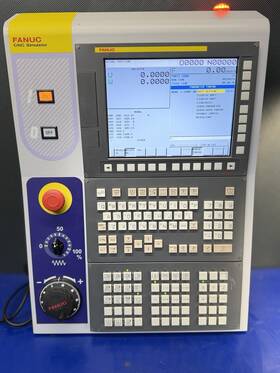
( Brand: Fanuc ), ( Manufacturer Part Number: A02B-0158-B100 ), ( Type: Cnc Simulator ), ( Unit Type: Unit ), ( Country Of Origin: Japan )
Review FANUC Cnc Simulator Us Seller Nda Available
The **FANUC A02B-0158-B100 CNC Simulator (NDA)** is a cutting-edge, high-fidelity training and development tool designed exclusively for advanced CNC programming, machine operation, and troubleshooting simulations. Built on FANUC s proprietary **iTNC 640i/840Di** control platform, this simulator provides an unparalleled, risk-free environment for users to master complex machining processes, including multi-axis milling, turning, and hybrid operations, without the need for physical equipment. The system leverages **real-time, physics-based modeling** to replicate the behavior of actual FANUC-controlled CNC machines, ensuring that every command, error condition, and operational response aligns precisely with industrial-grade controls. Ideal for both educational institutions and industrial training programs, the simulator supports a wide range of **G-code and M-code commands**, allowing users to practice programming, toolpath optimization, and adaptive control strategies in a fully interactive setting. Its **NDA (Non-Disclosure Agreement) restricted version** ensures that proprietary FANUC algorithms, control logic, and machine-specific behaviors remain confidential, making it a secure choice for organizations requiring sensitive intellectual property protection. The simulator also integrates with **FANUC s advanced diagnostics and error simulation tools**, enabling users to troubleshoot faults, interpret system messages, and refine problem-solving skills in a controlled, repeatable environment. With its **high-resolution graphical interface**, intuitive workflow, and seamless compatibility with FANUC s broader ecosystem of CNC software, this simulator is an indispensable asset for training the next generation of CNC technicians, engineers, and operators while minimizing downtime and operational risks in real-world applications.
### **Pros and Cons of buying a FANUC A02B-0158-B100 CNC Simulator (NDA)**
#### **Pros**
1. **Industry-Standard Training Tool**
The FANUC A02B-0158-B100 is a widely recognized simulator for CNC programming and operation, particularly for FANUC-controlled machines. It provides hands-on experience with real FANUC control systems, which is highly valuable for operators, programmers, and maintenance technicians in manufacturing environments.
2. **Hands-On Learning Without Risk**
Unlike traditional classroom training, this simulator allows users to practice CNC programming, troubleshooting, and machine operation in a virtual environment. This reduces the risk of errors on actual machines, saving time and preventing costly mistakes.
3. **Compatibility with FANUC Controls**
Since it is designed for FANUC systems (specifically the 0i, 0i-Mate, 16i, 18i, and 21i controls), users gain direct experience with the programming language (G-code, macros, system parameters) and interface that are standard in many industrial settings.
4. **Supports Advanced CNC Concepts**
The simulator includes features such as:- **Manual data input (MDI) programming**
- **Toolpath simulation**
- **Error simulation (for troubleshooting practice)**
- **Multi-axis programming (for milling, turning, and hybrid machines)**
This makes it useful for training on complex machining operations.
5. **Portability and Accessibility**
The simulator can be run on a PC (with compatible software), allowing users to practice anywhere with an internet connection (if cloud-based) or offline (if installed locally). This flexibility is beneficial for remote training or on-the-job learning.
6. **Cost-Effective Training Alternative**
While the upfront cost may be high, it eliminates the need for expensive physical machines for training. Over time, it can reduce operational costs associated with machine downtime or damage from inexperienced operators.
7. **Supports Certification Preparation**
Many CNC certification programs (e.g., FANUC s own training, NIST s CNC certification, or employer-specific exams) require practical experience with FANUC controls. This simulator provides the necessary exposure to pass such certifications.
8. **Customizable Training Scenarios**
Instructors or trainers can create custom workpieces, error conditions, or programming challenges to tailor training to specific needs, such as:- Basic G-code programming
- Advanced macro programming
- Machine setup and calibration
- Fault diagnosis
9. **Reduces Machine Wear and Tear**
By allowing operators to learn on a simulator before working on real machines, it minimizes unnecessary wear and tear on actual CNC equipment.
10. **Supports Remote Training**
In industries where on-site training is difficult (e.g., distributed manufacturing plants), the simulator enables remote instruction, reducing travel costs and logistical challenges.
---
#### **Cons**
1. **High Initial Cost**
The FANUC A02B-0158-B100 is a professional-grade simulator, and its price reflects that. For small businesses or individual operators, the investment may be prohibitive, especially if they lack immediate use for it.
2. **Requires Technical Knowledge to Set Up**
Installing and configuring the simulator may require IT or CNC expertise, particularly if the user needs to:- Install compatible FANUC software (e.g., FANUC CNC Simulator or FOCAS programming tools)
- Configure virtual machines or ensure hardware compatibility (e.g., PC specifications)
- Troubleshoot software conflicts
3. **Limited to FANUC Systems**
The simulator is specific to FANUC controls. Users working with other CNC brands (e.g., Siemens, Mazak, Haas) will need separate simulators for those systems, which adds to the cost and complexity of training.
4. **Learning Curve for Virtual Operation**
While the simulator mimics real CNC operation, some users may struggle with the transition from virtual to physical machines due to differences in:
- Haptic feedback (lack of physical resistance in virtual tools)
- Machine dynamics (e.g., vibration, cutting forces)
- Ergonomics (e.g., control panel layout differences)
5. **Software Dependencies**
The simulator relies on FANUC s proprietary software, which may require:- Regular updates (potentially at a cost)
- Compatibility with newer operating systems (e.g., Windows 10/11)
- Licensing agreements that restrict usage (e.g., NDA may limit sharing or redistribution)
6. **Not a Replacement for Physical Practice**
While the simulator is excellent for programming and troubleshooting, it cannot fully replicate the tactile experience of operating a real CNC machine. Users may still need hands-on practice on actual equipment before becoming fully proficient.
7. **Potential for Over-Reliance on Simulation**
Some trainees may become overly dependent on the simulator, leading to hesitation when transitioning to real machines. This could result in slower adaptation or increased anxiety during actual operation.
8. **Maintenance and Support Costs**
If the simulator is part of a larger training ecosystem, additional costs may arise for:- Software support from FANUC
- Hardware maintenance (e.g., PC upgrades)
- Training for instructors on how to effectively use the simulator
9. **NDA (Non-Disclosure Agreement) Limitations**
The requirement for an NDA may restrict how the simulator can be used or shared. For example:- Users may not be able to distribute or modify the software.
- Some training programs or educational institutions may face legal barriers to incorporating the simulator into their curriculum without approval.
10. **Depreciation Over Time**
Like all technology, CNC simulators can become outdated as FANUC updates its controls or introduces new features. Users may need to invest in newer versions or additional training tools to stay current.
---
### **Conclusion**
The **FANUC A02B-0158-B100 CNC Simulator** is a powerful and industry-relevant tool for training CNC operators, programmers, and technicians, particularly in environments where FANUC controls are standard. Its strengths lie in its realism, hands-on learning approach, and ability to reduce risks associated with real-machine training. However, the high cost, technical setup requirements, and limitations (such as brand specificity and NDA restrictions) make it less accessible for smaller businesses or individual users without significant training needs.
For **manufacturing companies, vocational schools, or large training programs** that frequently need to upskill employees on FANUC machines, the simulator is a worthwhile investment. It provides a scalable, cost-effective way to train multiple users without overburdening physical machines.
For **small workshops, hobbyists, or individuals** looking to learn CNC programming, alternative options such as free or lower-cost simulators (e.g., Fusion 360 s CNC simulation, Mach3/Mach4 simulators, or open-source alternatives) may be more practical. Additionally, some community colleges or trade schools offer access to CNC simulators at a fraction of the cost.
---
### **Recommendation**
**Buy the FANUC A02B-0158-B100 if:**- Your organization frequently uses FANUC-controlled CNC machines.
- You have a dedicated training budget and need a high-fidelity simulator for large-scale operator training.
- Your training program requires certification-ready experience with FANUC systems.
- You can justify the cost by reducing downtime or machine wear from inexperienced operators.
**Avoid or explore alternatives if:**- Your budget is limited, and you can achieve similar training goals with cheaper simulators or free software.
- You work primarily with non-FANUC CNC systems, as this simulator is not cross-compatible.
- You lack the technical resources to set up and maintain the simulator.
- Your training needs are minimal (e.g., occasional operator refreshers), and a lower-cost solution would suffice.
**Alternative Considerations:**- **Fusion 360 CNC Simulation** (Free with subscription): Good for basic programming and simulation but lacks FANUC-specific features.
- **Mach3/Mach4 Simulator** (Low-cost): Useful for general CNC training but not FANUC-branded.
- **FANUC s Official Training Programs**: Some may offer access to simulators as part of certification courses.
- **Rental or Leasing Options**: If purchasing outright is not feasible, explore leasing the simulator for training periods.
Ultimately, the decision should align with your organization s long-term training goals, budget, and the specific needs of your CNC workforce.
Details:
Serial no E17YPB007. FanucA02B-0158-B100 CNC Simulator. The Simulator is an actual FANUC CNC control, so students will become familiar with the look, feel, function and layout of the control as they navigate program a fully operational control. Used item in good working condition.
There is a palatalization fee of $50 minimum up to 5%of the purchase price, unless waived by us. Item comes as pictured. Type A02B-0158-B100. Uploading and downloading read punch functions use a Flash ATA interface USB interface, DNC are supported by Ethernet card.
Model CNC Simulator.
part #: a02b0158b100 prices
- $3800.00-$5499.00
specifications automationjack:
- brand: Fanuc
- mpn: A02b-0158-b100
- type: Cnc Simulator
- unit type: Unit
- country of origin: Japan
offer automationjack:
- quantity: 1
- options: Ship-to-home
- sold: 0
- best offers: True
- availability: In Stock
- started: March 30, 2026
shipping automationjack:
- carrier: UPS
- class: Standard, One-day
- transit: 4-10 Days
- type: Calculated
- service: UPS Ground, UPS Next Day Air Saver
- cost: $123.01
returns automationjack:
- method: Money back
- paid by: Buyer
- time: 30 Days
- policy: Returns Accepted
seller automationjack:
- rating: 100.0%
- city: Fort Worth, Texas
- # reviews: 509
general automationjack:
- Business Industrial > Industrial Automation Motion Controls > Other Automation Equipment
- condition: Used
payments automationjack:
- check
- cash
- credit card: Mastercard
- money order
- other
- wallet: Google-pay
Fanuc A02B-0158-B100 Is Similar To:
- Fanuc A20b-8100-0137 19g 21it Cnc Control System Complete Except Servo Motors (41.5% similar) Was fully operational when removed from a working blond lathe 8 months ago. Also have two Muller servo drives on separate listing that were from the same machine. Complete Fanuc 21IT cnc control except for servo drives and motors. Can be used with anyone's analog servos...(October 31st, 2024)
- Fanuc A20b-1007-0401 A20b-1007-0401 02a Pcb With Heat Sink C206 b Usa Seller (41.8% similar) Please see pictures for condition and details. The injection molding machine pictured Cincinnati macron-fanuc robot 110, year 2000 see details in pictures was clamping at around 70 tons instead of the expected 110 and no longer met their specifications. That is why the machine was removed from ...(January 16th, 2025)
- Fanuc A16b-2200-0955 05a Control Board Overnight Shipping Available (46.4% similar) Manufacturer: Fanuc. Specifications: condition. All products include our 30-DAY warranty, not the original manufacturers warranty. Part number: A16B-2200-0955/05A...(March 20th, 2025)
- Fanuc A20b-0009-0534 25j Control Board Overnight Shipping Available (49.6% similar) Manufacturer: Fanuc. Specifications: condition. All products include our 30-DAY warranty, not the original manufacturers warranty. Part number: A20B-0009-0534/25J...(April 2nd, 2025)
- Fanuc A06b-6052-h002 Spindle Drive Overnight Shipping Available (51.2% similar) Manufacturer: Fanuc. Specifications: condition. Part number: A06B-6052-H002. All products include our 30-DAY warranty, not the original manufacturers warranty...(April 17th, 2025)
- Fanuc A05b-2301-c335 Teach Pendant Overnight Shipping Available (47.9% similar) Manufacturer: pendant. All products include our 30-DAY warranty, not the original manufacturers warranty. Part number: A05B-2301-C335. Specifications: condition...(May 9th, 2025)
- Fanuc A02b-0281-c071 Lcd Unit Overnight Shipping Available (55.2% similar) Part number: A02B-0281-C071. Specifications: LCD unit. All products include our 30-DAY warranty, not the original manufacturers warranty. Used condition. Manufacturer: Fanuc...(May 27th, 2025)
- Fanuc A16b-2200-0930 06a Plc Board Processor Overnight Shipping Available (47.3% similar) Manufacturer: Fanuc. Part number: A16B-2200-0930/06A. All products include our 30-DAY warranty, not the original manufacturers warranty. Specifications: condition...(June 26th, 2025)
- Fanuc Ic200ual005-ch Versa Max Overnight Shipping Available (42.7% similar) Specifications: condition. All products include our 30-DAY warranty, not the original manufacturers warranty. Manufacturer: Fanuc. Part number: IC200UAL005-CH...(June 27th, 2025)
- Fanuc A02b-0118-b002 Power Mate Servo Amplifier Overnight Shipping Available (50.7% similar) Part NUMBER:A02B-0118-B002. Manufacturer: Fanuc. Specifications: condition. All products include our 30-DAY warranty, not the original manufacturers warranty...(July 21st, 2025)
- Fanuc A16b-2202-0773 06b Overnight Shipping Available (48.6% similar) Part number: A16B-2202-0773/06B. Manufacturer: Fanuc. Specifications: used condition. All products include our 30-DAY warranty, not the original manufacturers warranty...(July 25th, 2025)