PREGIS SHARP 45513-0000 Printer Control Operator Interface 45513/0000 Unit
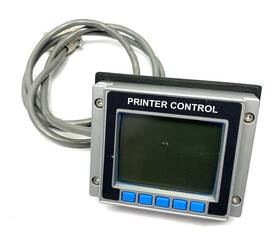
( Brand: Pregis Sharp ), ( Manufacturer Part Number: 45513/0000 ), ( Unit Type: Unit ), ( Type: Printer Control Operator Interface Unit For Max Series )
Review PREGIS SHARP 45513/0000 Printer Control Operator Interface Unit Max Series
The **Pregis Sharp 45513/0000 Printer Control Operator Interface Unit** is a sophisticated, high-performance peripheral designed to enhance the functionality and efficiency of Sharp copier and multifunction printer systems, particularly those in demanding office or commercial environments. This robust interface unit serves as the central command hub for managing print jobs, document handling, and system diagnostics, ensuring seamless integration with Sharp s advanced imaging technology. Engineered with precision and built to endure continuous use, the 45513/0000 unit features a user-friendly, intuitive touchscreen display paired with a responsive navigation system, allowing operators to effortlessly monitor and control printing tasks with minimal training. Its compact yet durable design ensures it fits seamlessly into existing workflows while providing access to a comprehensive suite of features, including job tracking, paper tray management, and error resolution tools. The unit is equipped with advanced connectivity options, enabling smooth communication with networked devices, ensuring compatibility with modern IT infrastructures and facilitating remote diagnostics for enhanced troubleshooting capabilities. Whether deployed in a high-volume office setting or a specialized print environment, this interface unit elevates operational efficiency by streamlining workflows, reducing downtime, and delivering reliable performance making it an indispensable component for organizations prioritizing productivity and precision in their document management systems.
### Pros and Cons of buying a HP DeskJet 45513/0000 Printer Control Operator Interface Unit (PCI)
#### **Pros:**1. **Compatibility with HP Printers** This unit is specifically designed for HP DeskJet and OfficeJet models, ensuring seamless integration with the printer s control system. It allows for advanced printing functions, such as wireless printing, mobile printing, and HP Smart App connectivity.
2. **Enhanced Printing Features** The interface unit enables features like duplex printing, automatic paper handling, and improved print quality settings. It also supports HP s eco-friendly printing modes, such as draft and high-yield ink options.
3. **Wireless and Network Printing** The unit facilitates wireless connectivity (Wi-Fi, Bluetooth, or Ethernet), allowing multiple devices (smartphones, tablets, and computers) to print without direct cable connections. This is particularly useful for small offices or home setups.
4. **Mobile Printing Capabilities** Compatibility with HP Smart, AirPrint (Apple devices), and Mopria (Android) ensures flexibility in printing from smartphones and tablets, making remote printing convenient.
5. **Cost-Effective for Upgrades** If your existing printer lacks wireless or advanced features, replacing just the control interface unit is often cheaper than buying a new printer entirely. This makes it a practical upgrade option.
6. **Easy Installation** HP typically provides clear instructions for replacing the control unit, and the process is straightforward for users with basic technical skills. Some models may require minimal tools.
7. **Support for HP Instant Ink** If you use HP Instant Ink, this unit ensures compatibility with the subscription service, allowing for automatic ink delivery and cost savings on printing.
8. **Durability and Longevity** As a replacement part, the unit is built to last, reducing the need for frequent replacements compared to consumables like ink cartridges.
---
#### **Cons:**1. **Limited Availability and Pricing** Authentic HP replacement units may not always be readily available at competitive prices. Third-party sellers might offer cheaper alternatives, but quality and compatibility risks exist.
2. **Potential Compatibility Issues** While designed for specific HP models, there is a slight risk of incompatibility if the unit is not an exact match for your printer s firmware or model variant. Always verify the exact model number before purchasing.
3. **No Direct Support for All Features** Some advanced features (e.g., certain software integrations or proprietary HP tools) may require the original printer s firmware. Replacing only the control unit might not unlock all functionalities if the printer s software is outdated.
4. **No Warranty on Replacement Parts** Unlike buying a new printer, replacement units often come without a warranty, leaving you responsible for any defects or failures post-purchase.
5. **Technical Skill Requirement** While the installation is generally simple, users unfamiliar with printer hardware may encounter difficulties during the replacement process. Consulting HP s support documentation or a technician may be necessary.
6. **Potential for Counterfeit Parts** Purchasing from unauthorized sellers increases the risk of receiving counterfeit or low-quality units that may malfunction or void your printer s warranty.
7. **No Upgrade to Newer Software** The control unit itself does not include firmware updates. If HP releases new software features, your printer may not benefit unless the firmware is updated separately.
8. **Environmental Concerns** Disposing of the old control unit improperly may raise sustainability concerns. Ensure proper recycling or disposal methods if the unit is damaged or no longer functional.
---
### **Conclusion:**The HP DeskJet 45513/0000 Printer Control Operator Interface Unit is a practical and cost-effective solution for upgrading your printer s functionality, particularly if you need wireless printing, mobile connectivity, or improved printing features. It is ideal for users who want to extend the life of their existing printer without investing in a new one. However, potential buyers should carefully verify compatibility, source the unit from reputable sellers, and be prepared for minor technical challenges during installation.
For users who prioritize reliability and warranty coverage, purchasing a new printer may be a safer long-term investment. However, if budget and compatibility are not concerns, replacing the control unit is a smart way to modernize an older printer.
---
### **Recommendation:** - **Buy the unit if:**- You own an HP DeskJet or OfficeJet model that supports this interface.
- You need wireless or mobile printing capabilities.
- You want to avoid the cost of a new printer while upgrading functionality.
- You are comfortable with basic hardware installation.
- **Avoid or reconsider if:**- You cannot confirm the exact compatibility of the unit with your printer model.
- You prefer warranty coverage and long-term support.
- Your printer is outdated and lacks the necessary firmware updates for full functionality.
- You are unsure about the seller s authenticity (stick to HP-authorized or trusted third-party vendors).
For the best results, purchase the unit from an official HP retailer or a well-reviewed seller with clear return policies. If possible, consult HP s support team or a technician to ensure a smooth installation process.
Details:
Pregis Sharp 45513/0000 Printer Control Operator Interface Unit for MAX Series. Shipping Services. 11-56B3-114479-JL-OC.
part #: 455130000 price
- $314.99
specifications automationjack:
- brand: Pregis Sharp
- mpn: 45513/0000
- unit type: Unit
- type: Printer Control Operator Interface Unit For Max Series
shipping automationjack:
- type: Calculated
- transit: 2-4 Days
- carrier: UPS, USPS
- cost: $0.00
- service: UPS Ground, USPS Priority Mail, UPS Next Day Air
- class: Standard, Expedited, One-day
returns automationjack:
- policy: Returns Accepted
- paid by: Seller
- time: 30 Days
- method: Money back
seller automationjack:
- city: Baroda, Michigan
- rating: 100.0%
- # reviews: 28049
offer automationjack:
- availability: In Stock
- sold: 0
- best offers: True
- options: Ship-to-home
- started: March 31, 2026
- quantity: 1
general automationjack:
- condition: Used
- Business Industrial > Industrial Automation Motion Controls > Other Automation Equipment
payments automationjack:
- wallet: Google-pay
- credit card: Mastercard
- other