PROFACE 3080028-02 Touch Screen 4012F6PR6
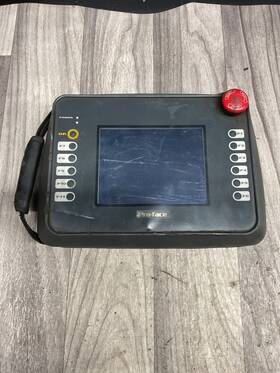
( Brand: Proface ), ( Manufacturer Part Number: 3080028-02 ), ( Type: Touch Screen ), ( Unit Type: Unit ), ( Country Of Origin: Japan )
Review PROFACE Touch Screen Parts Only #4012f6pr6
The Proface 3080028-02 is a high-performance, industrial-grade touchscreen controller designed to elevate automation, manufacturing, and process control systems with precision and reliability. Engineered for demanding environments, this compact yet robust device integrates seamlessly into PLC (Programmable Logic Controller) setups, offering an intuitive and responsive 4.3-inch capacitive touchscreen interface that simplifies human-machine interaction (HMI) while maintaining durability. The 4012F6PR6 model features a sleek, backlit display with a resolution of 480x272 pixels, delivering crisp, high-contrast visuals that enhance readability even under challenging lighting conditions, such as bright factory floors or direct sunlight. Built to withstand harsh industrial conditions, this touchscreen is rated for operation in temperatures ranging from -20 C to 60 C (-4 F to 140 F) and can endure humidity levels up to 95% non-condensing, making it ideal for environments exposed to moisture, dust, or temperature fluctuations. Its robust construction includes an IP65-rated enclosure, which provides protection against dust ingress and low-pressure water jets, ensuring longevity and minimal maintenance in dirty or wet settings.
At its core, the Proface 3080028-02 excels in flexibility and connectivity, supporting a wide array of communication protocols such as Modbus RTU/TCP, Profibus DP, DeviceNet, Ethernet/IP, and CANopen, among others. This versatility allows it to interface effortlessly with various PLC brands, including Siemens, Allen-Bradley, Mitsubishi, and Omron, while also supporting advanced features like OPC UA for enhanced data integration and remote monitoring. The device s intuitive software environment, Proface s HMI Studio, enables users to develop customizable, user-friendly interfaces with drag-and-drop functionality, graphical trends, alarm management, and real-time data visualization. Whether deployed for process monitoring, machine control, or energy management, the 4012F6PR6 model ensures operators can interact with complex systems with ease, reducing training time and minimizing human error.
Beyond its technical capabilities, the Proface 3080028-02 stands out for its scalability and future-proofing. Its modular design allows for easy expansion, accommodating additional I/O modules or communication ports as operational needs evolve. The touchscreen s multi-touch support and gesture controls further enhance usability, enabling quicker navigation through menus and reducing the need for physical buttons or switches. Security is also a priority, with features like user authentication, role-based access control, and encrypted communication protocols to safeguard sensitive data and prevent unauthorized access. Whether integrated into a small-scale automation project or a large-scale industrial facility, this touchscreen controller delivers a blend of cutting-edge functionality, rugged reliability, and user-centric design, making it an indispensable tool for modern manufacturing and automation applications.
### **Pros and Cons of buying a Proface 3080028-02 (Touch Screen 4012F6PR6)**
#### **Pros:**1. **High-Quality Touchscreen Display** The 4012F6PR6 features a large, high-resolution touchscreen (typically 12-inch or larger) with excellent visibility in industrial environments. The touch interface enhances usability for operators, reducing reliance on physical buttons and improving efficiency.
2. **Rugged and Durable Design** Proface panels are known for their robust construction, designed to withstand harsh industrial conditions, including temperature fluctuations, dust, and moisture. This model is likely built to meet IP65 or higher ratings, ensuring long-term reliability in demanding settings.
3. **Modular and Flexible Configuration** The 3080028-02 series supports various communication protocols (e.g., Ethernet, Profibus, Modbus) and can be customized with additional I/O modules, making it adaptable to different automation needs.
4. **User-Friendly Human-Machine Interface (HMI)** The touchscreen interface is intuitive, allowing for easy programming, monitoring, and control of machinery. It often includes features like drag-and-drop programming, which simplifies development for engineers and technicians.
5. **Compatibility with PLCs and SCADA Systems** This panel integrates seamlessly with major PLC brands (e.g., Siemens, Allen-Bradley, Mitsubishi) and SCADA software, enabling centralized monitoring and control in large-scale industrial applications.
6. **Energy Efficiency and Low Power Consumption** Proface panels are designed to be energy-efficient, reducing operational costs over time while maintaining performance.
7. **Warranty and Support** Proface offers comprehensive warranties and technical support, which can be crucial for maintaining uptime in critical industrial processes.
---
#### **Cons:**1. **Higher Upfront Cost** Compared to basic non-touch or lower-end HMI panels, the Proface 3080028-02 represents a significant investment. The premium features and durability come at a higher price point, which may be a barrier for smaller businesses or budget-conscious projects.
2. **Complexity in Setup and Programming** While the touchscreen interface is user-friendly, initial setup and programming may require technical expertise, especially for users unfamiliar with HMI software. Training costs or hiring specialists could add to the overall expense.
3. **Potential for Overkill in Simple Applications** If the application does not require advanced touch functionality or high-resolution graphics, a simpler, less expensive HMI panel might suffice. Investing in this model for basic monitoring could be unnecessary.
4. **Limited Customization for Non-Standard Use Cases** Some industrial environments may have unique requirements that are not fully supported by standard Proface configurations. Custom development or additional hardware may be needed, increasing costs and complexity.
5. **Dependence on Proface s Ecosystem** If the user relies heavily on Proface s proprietary software or support, switching to alternative HMI solutions in the future could be challenging. Vendor lock-in is a potential drawback.
6. **Physical Size and Installation Constraints** The larger touchscreen and rugged enclosure may require more space on the control panel or machine, which could be a limitation in compact or retrofitted systems.
7. **Potential for Software Licensing Costs** Advanced features (e.g., multi-user access, cloud connectivity) may require additional licensing, adding to the total cost of ownership.
---
### **Conclusion:**The **Proface 3080028-02 (4012F6PR6)** is a high-quality, rugged touchscreen HMI panel that excels in industrial environments requiring reliability, flexibility, and advanced user interaction. Its strengths lie in durability, ease of use, and compatibility with major automation systems, making it ideal for applications where uptime, operator efficiency, and scalability are critical.
However, the higher cost, complexity of setup, and potential over-specification for simpler applications may not justify the purchase for all users. It is best suited for:
- Large-scale manufacturing or process control systems.
- Applications requiring frequent operator interaction or remote monitoring.
- Environments with harsh conditions where reliability is non-negotiable.
For smaller operations, basic control panels, or non-critical applications, a lower-cost alternative might be more practical.
---
### **Recommendation:** **Buy the Proface 3080028-02 if:**- Your application demands a rugged, high-performance touchscreen HMI.
- You require seamless integration with PLCs or SCADA systems.
- The environment is industrial-grade, with exposure to dust, moisture, or temperature extremes.
- You prioritize long-term reliability and support over initial cost savings.
**Consider alternatives if:**- Your budget is constrained, and a simpler or lower-cost HMI panel will meet your needs.
- The application does not require advanced touch functionality or high-resolution graphics.
- You lack in-house expertise for setup and programming, and training costs would be prohibitive.
Ultimately, weigh the long-term benefits of reduced downtime, improved operator efficiency, and scalability against the upfront and operational costs to determine if this panel aligns with your project s requirements.
Details:
part #: 308002802 prices
- $100.00-$250.00
specifications automationjack:
- brand: Proface
- mpn: 3080028-02
- type: Touch Screen
- unit type: Unit
- country of origin: Japan
general automationjack:
- Business Industrial > Industrial Automation Motion Controls > Other Automation Equipment
- condition: For parts or not working
payments automationjack:
- wallet: Google-pay
- credit card: Mastercard
- other
shipping automationjack:
- service: USPS Ground Advantage
- cost: $0.00
- transit: 4-7 Days
- class: Standard
- type: Fixed
- carrier: USPS
returns automationjack:
- policy: No Returns
offer automationjack:
- availability: In Stock
- best offers: True
- quantity: 1
- sold: 0
- started: February 26, 2026
- options: Ship-to-home
seller automationjack:
- city: Scottsburg, Indiana
- # reviews: 19521
- rating: 99.9%
Proface 3080028-02 Is Similar To:
- Proface Glc2500-tc41-200v One Used Pro-face Touch Screen (45.9% similar) Return police: please leave a telephone number for on-time delivery. You should receive the item within 2-4 weeks. Shipping detail. It will just take you 1 minute. Serious buyers only, please. The product at fixed price, please pay as soon possible after the purchase...(December 13th, 2024)
- Proface 288004502 Pro Face 2880045-02 Gp2600-tc41-24v Touch Screen Control Panel Monitor Interface (47.7% similar) The panel works, and was removed from a working environment. This is a pro face 2880045-02 GP2600-TC41-24V touch screen control panel monitor interface...(February 6th, 2025)
- Proface Ast3201-a1-d24 Used And Tested Touch Screen (48.1% similar) Part #: Proface AST3201-A1-D24 for sale...(May 29th, 2025)